
ICAO Doc 9303 · Passport Seva 2.0 ready
ICAO standard photograph, made online in a minute.
Got “photo is not valid as per ICAO standards”? Upload the rejected photo and we turn it into an ICAO standard photograph with a white background, the right face size and exact pixels for Passport Seva, UK, US, Schengen and 50+ other countries.
Free ICAO check and preview · no account needed
- Built on ICAO Doc 9303
- Never sold or shared
- Free remake if rejected
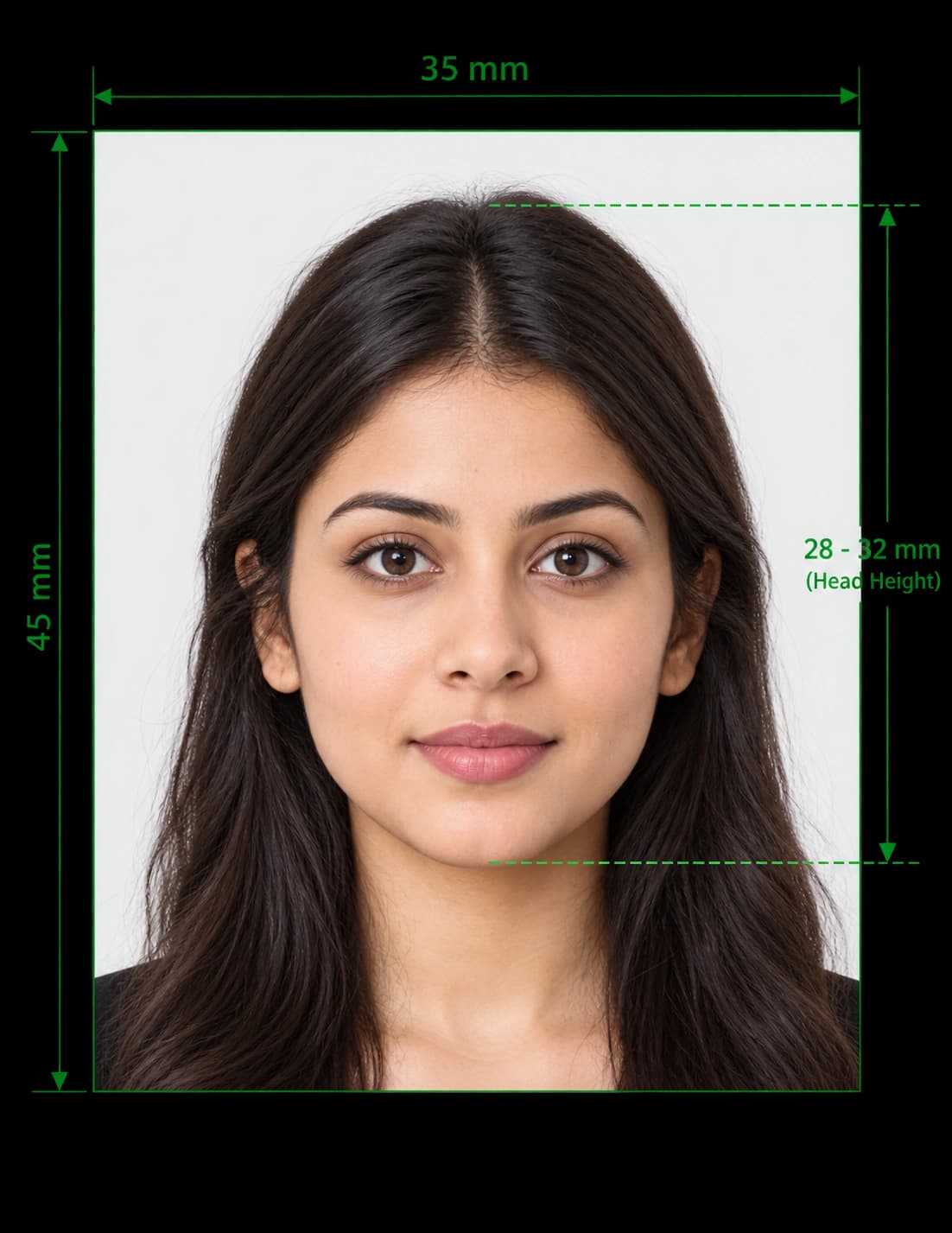
Free ICAO photo checker
Free ICAO standards photo checker online
An online passport photo checker and maker in one: choose your country, upload any front-facing photo and preview a corrected ICAO compliant photograph free.
- Upload
- ICAO fix
- Preview
- Download
Upload or take a photo
JPEG, PNG or WebP up to 20 MB · a phone photo is fine
Fix my photo free- Face the camera, neutral expression
- Eyes open, mouth closed, no glasses
- Even light, no shadows on face
- Any background — we replace it
Free check and preview. Your photo is never sold or shared.
Rules checked against official sources on
- countries and visa formats
- 50+
- from upload to ICAO photo
- ~1 min
- ICAO check and preview
- Free
- accounts or subscriptions
- 0
The basics
What is an ICAO standard photograph?
Why ICAO photo standards exist
ICAO is the UN agency that sets rules for international travel documents. Its photo standard is used by more than 190 countries, so an ICAO compliant photo works for most passports and visas. Each country then adds its own print size, pixel size and file limit.
Other names for an ICAO photo
You may see it called an ICAO compliant photo, ICAO format photo, ICAO passport photo, biometric passport photo, foto ICAO or formato ICAO (Italian and Spanish), or biyometrik fotoğraf (Turkish). They all mean the same standard.
The error explained
What does “photo is not valid as per ICAO standards” mean?
Indian embassies and consulates moved passport applications to the Global Passport Seva Portal 2.0 in 2025, which checks every uploaded photo against ICAO rules automatically. That is why many applicants, including those renewing a passport from abroad, now see this error for photos that were accepted before.
Common photo error messages and how to fix them
| Error message | What it means | How to fix it |
|---|---|---|
| “Photo is not valid as per ICAO standards” | The portal’s automatic checker found at least one problem: face too small or too large, background not plain white, shadows, tilt or the wrong size. | Re-make the photo at the exact size with a white background and the face filling 80–85% of the height. |
| “Posture check failed. Please upload another photo” | Your head is tilted, turned, or your shoulders are not square to the camera. Image quality is not the issue. | Retake facing the camera straight on, chin level, both ears equally visible. |
| “isMobileDeviceDetected failed. Please upload another photo” | The checker thinks the image is a phone screenshot or selfie: wide-angle distortion, arm-length framing or screen borders. | Ask someone to take the photo from 1–1.5 m away, then crop and resize it properly rather than uploading the raw selfie. |
| “Photo upload not working / stuck” | Usually the file is the wrong format, too large, or the pixel size does not match what the form expects. | Use a JPEG at the exact pixel size and under the file-size limit (250 KB for Passport Seva). |
Passport Seva photo upload not working?
Most Indian passport photo upload issues come from four things: a face that fills less than 80% of the photo height (older studio photos were cropped at 70–80%), a light-grey background instead of white, a selfie taken at arm’s length, and a file larger than 250 KB or not exactly 630 × 810 px. Fixing all four solves most rejections.
Requirements
ICAO photo standards and passport photo requirements
ICAO photo guidelines checklist
| Rule | ICAO requirement | What our tool does |
|---|---|---|
| Face size | Face (chin to crown) fills about 70–80% of the photo height. Indian Passport Seva 2.0 expects 80–85%. | Scale and crop to the ratio for the country you choose. |
| Head position | Face centred, looking straight at the camera, head not tilted or turned. | Detect the eyes and centre the face; strong tilts are flagged so you can retake. |
| Background | Plain, uniform and light: white or off-white, no patterns, objects or shadows. | Remove the background and replace it with plain white. |
| Expression | Neutral expression, mouth closed, both eyes open and clearly visible. | Checked; we cannot change your expression, so retake if you are smiling. |
| Glasses | Strongly discouraged; India, the UK and the US now require no glasses at all. | Take glasses off before the photo. Glare on lenses is a top rejection reason. |
| Lighting | Even light on the face, no shadows, no red-eye, natural skin tone. | Balance exposure and colour without retouching facial features. |
| Head coverings | Not allowed, except for religious or medical reasons, with the full face visible from chin to forehead. | Supported when the face edges are visible. |
| Recency | Taken within the last 6 months and showing your current appearance. | Use a new photo; we never reuse old images. |
| File (digital) | Set by each country, e.g. Passport Seva: JPEG, 630 × 810 px, up to 250 KB. | Export at the exact pixel size as a compressed JPEG. |
Acceptable ICAO photo
- Recent colour photo, sharp and in focus
- Plain white or off-white background
- Face straight on, centred, neutral expression
- Both eyes open, hair away from eyes
- Even lighting with no shadows
Rejected photo
- Selfie at arm’s length (distorted face, “mobile device detected”)
- Smiling with teeth, head tilted, or looking away
- Glasses, glare, or a hat or cap
- Shadows on the face or behind the head
- Grey, patterned, or coloured background
- Old, filtered, edited or beauty-mode photo
Examples
ICAO photo examples: before and after
Real phone photos that would fail an ICAO check, and the compliant photographs made from them.
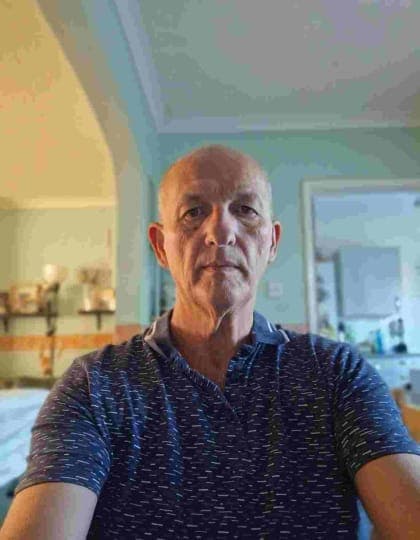
Before 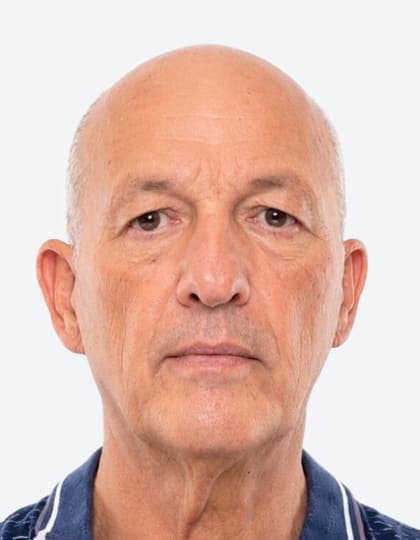
After Wall shadow and yellow tint removed
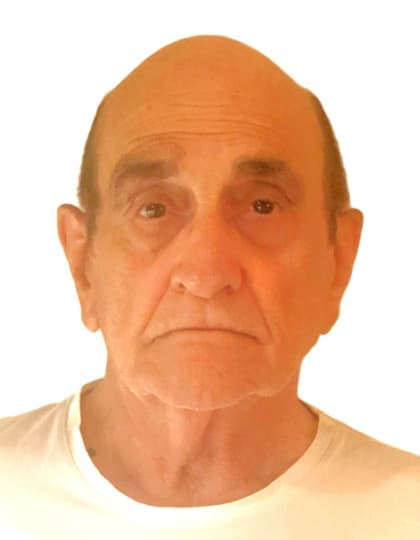
Before 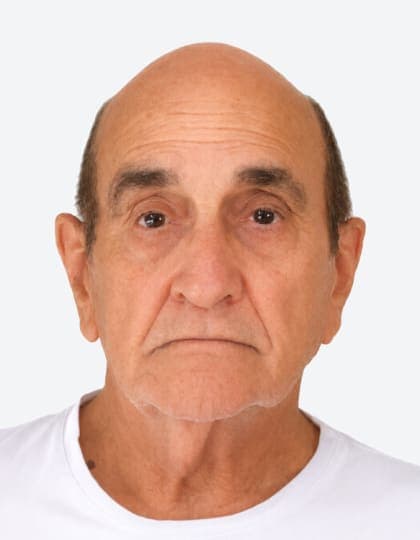
After Tilted, off-centre head aligned
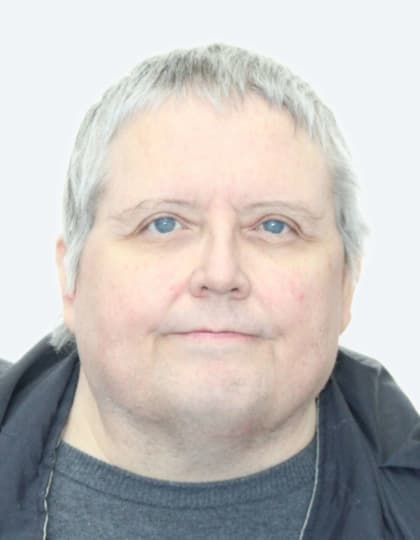
Before 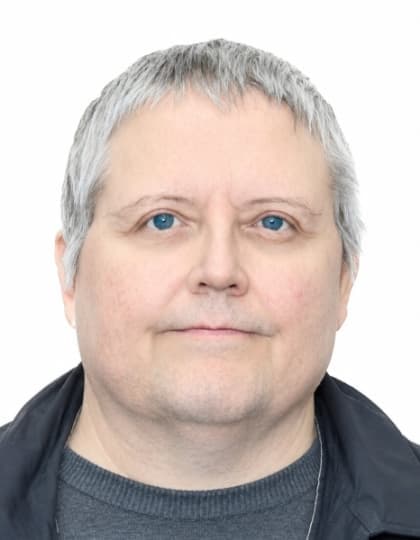
After Harsh light and glare balanced
Acceptable vs rejected infant passport photo
- Baby lying on a plain white sheet, photographed from above
- Eyes open where possible (newborns are allowed some leniency)
- Face straight on, whole head visible
- A parent’s hands, arms or shoulder in the frame
- Dummies, toys or bottles visible
- Baby in a car seat or with a patterned blanket behind
Photo sizes
ICAO standards photo size by country
| Country / document | Printed size | Digital upload |
|---|---|---|
| India (Passport Seva 2.0) | 35 × 45 mm (some missions abroad: 2 × 2 in) | 630 × 810 px, JPEG, ≤ 250 KB |
| United Kingdom | 35 × 45 mm | 600 × 750 px minimum |
| United States | 2 × 2 in (51 × 51 mm) | 600 × 600 px minimum |
| Schengen / EU visa | 35 × 45 mm | 630 × 810 px |
| Canada | 50 × 70 mm | Set by the application form |
| Australia | 35 × 45 mm | 413 × 531 px |
| New Zealand | 35 × 45 mm | 900 × 1200 px minimum |
| China | 33 × 48 mm | 420 × 560 px |
Governments change these rules. Always confirm on the official site of the office you are applying to; the checker above lists all 50+ formats we support.
India
Indian passport photo size and guidelines
India passport photo size, dimensions and photo requirements for new passports and renewals.
India passport picture requirements
| Item | Requirement |
|---|---|
| Pixel size | 630 × 810 px (35 × 45 mm ratio, 7:9) |
| File | JPEG, up to 250 KB |
| Face size | Face fills 80–85% of the photo height |
| Background | Plain white, no shadows |
| Glasses | Not allowed (medical exceptions only) |
| Recency | Taken in the last 6 months |
| Printed (where asked) | 35 × 45 mm, or 2 × 2 in at some missions abroad |
Indian passport renewal photo size and requirements
Renewal and re-issue use the same ICAO rules and the same photo size as a new passport. Use a new photo; the one in your old passport will not be accepted.
Applying in India or abroad
At a Passport Seva Kendra in India your photo is usually taken at the appointment. Applications through Indian embassies and consulates abroad need an uploaded ICAO photo, and some missions also ask for printed copies.
How it works
How to convert a photo to ICAO standard
Four steps, about a minute, from any phone photo.
- 1
Take a plain front-facing photo
Stand about 1–1.5 m from the camera in even daylight. Face the lens, keep a neutral expression, eyes open, no glasses. Any background works.
- 2
Upload it and choose your country
Pick the passport, visa or ID you are applying for. We load that country’s ICAO size, face ratio and file rules.
- 3
We fix it automatically
The background is replaced with white, the face is centred and scaled, and the photo is resized to the exact pixels.
- 4
Preview free, then download
Compare before and after, then download the clean JPEG and a printable 6×4″ sheet, ready to upload to Passport Seva or any portal.
Compare
Online ICAO photo maker vs photo studio vs free checkers
Free checkers are good for a quick test and studios suit people who need prints. An online maker is fastest when you need an exact digital file for a portal.
| Feature | PixPassport | Photo studio | Free online checkers |
|---|---|---|---|
| Exact digital size for the portal | Yes, per country | Often print only | Sometimes |
| White background replacement | Automatic | Backdrop in studio | Rarely |
| Face ratio for Passport Seva 2.0 (80–85%) | Yes | Depends on studio | Usually generic |
| Preview before paying | Free | No | Yes |
| Human review option | Expert plan | Yes | No |
| Time | About 1 minute | Travel + wait | Varies |
| Watermark-free download | After one payment | Prints only | Often watermarked or paid |
Trust
Who made this guide and how we check it
Based on official rules
Every requirement on this page comes from ICAO Doc 9303 and the official photo notices of the passport offices listed below, not from other photo websites.
Tested on real rejections
The PixPassport team built the tool from photos customers had rejected by passport portals, and checks the output against each country’s size, face-ratio and file limits.
Independent and private
We are not a government website. Your photo is used only to make your passport photo and is never sold or used to train models.
Official sources
- ICAO Doc 9303 — Machine Readable Travel Documents (photo specifications)
- Indian mission notice: Guidelines for ICAO-compliant photographs for passport applications
- Passport Seva — official portal (photo guidelines and notices)
- GOV.UK — Photos for passports
- U.S. Department of State — Passport photo requirements
Written by the PixPassport editorial team · Last reviewed
FAQ
ICAO photo questions, answered
What is the ICAO standard for a photo?
An ICAO standard photograph is a passport or ID photo that follows the International Civil Aviation Organization’s Doc 9303 rules for machine-readable travel documents: plain light background, neutral face looking straight at the camera, eyes open, no shadows or glasses, and the face filling a fixed share of the frame so face-recognition gates can read it.
What does “photo is not valid as per ICAO standards” mean?
It means the portal’s automatic checker compared your photo with the ICAO Doc 9303 photo rules and found a problem. The usual causes are a face that is too small or too large in the frame, a background that is not plain white, shadows, a tilted head, glasses, or the wrong pixel size. Fix those and upload again.
Why does Passport Seva reject my photo when the image quality is fine?
The Passport Seva photo check looks at geometry, not only sharpness. A clear photo still fails if the face covers less than about 80% of the height, the head is tilted, or the background has shadows. Messages like “posture check failed” or “isMobileDeviceDetected failed” point to framing and posture, not quality.
How do I check if my photo is ICAO compliant?
Upload it to the free ICAO photo checker at the top of this page. It checks the background, head size, eye line and pixel size for the country you choose and shows a corrected preview, so you can see the result before you submit it anywhere.
What is the ICAO standard photo size?
ICAO does not set one size for every country. It sets the proportions and each country picks the physical and pixel size. The most common size is 35 × 45 mm. India’s online upload uses 630 × 810 px JPEG up to 250 KB, the UK uses 35 × 45 mm and the US uses 2 × 2 inches.
How do I convert my photo to ICAO standard?
Take a front-facing photo in even light, upload it above and choose your country. We replace the background with white, centre and scale your face to the ICAO ratio, and resize it to the exact pixels. Preview it free, then download.
What is the Indian passport photo size?
For online upload on Passport Seva, use a 630 × 810 pixel JPEG (35 × 45 mm ratio) up to 250 KB, with a white background and the face filling 80–85% of the height. Some Indian missions abroad still ask for 2 × 2 inch prints, so check your mission’s notice.
Is the photo size different for Indian passport renewal?
No. A renewal (re-issue) uses the same ICAO photo rules and the same 630 × 810 px upload size as a new application. You need a new photo taken in the last 6 months; you cannot reuse the photo from your old passport.
Why is my Passport Seva photo upload not working?
The most common reasons are a file over 250 KB, a PNG or HEIC file instead of JPEG, or pixel dimensions other than 630 × 810. Export the photo as a JPEG at the exact size and try again; clearing the browser cache or using a desktop browser also helps.
Can you show an example of an ICAO photo?
Yes. The hero image and the before-and-after examples on this page show ICAO compliant photographs: plain background, centred face, neutral expression, and the head filling the frame between the guide lines.
Can I wear glasses in an ICAO photo?
Avoid them. ICAO strongly discourages glasses, and India, the UK and the US do not accept them except for medical reasons with a doctor’s note. Glare on lenses is one of the most common rejection reasons.
Are infant and baby photos held to ICAO standards?
Yes, with some leniency. Babies under about one year do not need a neutral expression or fully open eyes in every country, but the background must be plain and no hands, toys or dummies may be visible. Lay the baby on a white sheet and photograph from above.
What if my photo is still rejected?
With the Expert plan, a person checks your photo before you get it, and we remake it free if an official portal rejects it. Email us the rejection message and your PayPal order reference.
Do you store my photo?
Your photo is processed only to create your passport photo and is stored only as long as needed to deliver your download. We never sell it, share it, or use it to train models.
Policies
Refunds, privacy and support
Refund policy
You see a free preview before paying. If your downloaded photo has a technical fault, or an official portal rejects an Expert-checked photo, email us within 30 days with your PayPal order reference and the rejection message. We will remake the photo or refund you in full.
Privacy
Photos are sent over an encrypted connection to our processing service only to create your passport photo. Payments are handled by PayPal, which sends your receipt; we never see your card or PayPal details. We do not sell or share your data.
Terms
PixPassport is an independent photo service, not affiliated with ICAO, Passport Seva, the Ministry of External Affairs or any government. Final acceptance is always decided by the issuing authority. Upload only photos of yourself or people you are authorised to apply for.
Contact
Email [email protected] with your PayPal order reference. We reply within one working day.
Get an ICAO standard photograph that passes the first time.
Upload your photo, check it free, and see your ICAO photo before you decide.
Upload your photo